class: center, middle, inverse, title-slide # Meet R ## “R, in itself, is an attempt to bring order out of chaos.” ### Otho Mantegazza<br>2019-11-20 --- # The Rise of Private Space Agencies 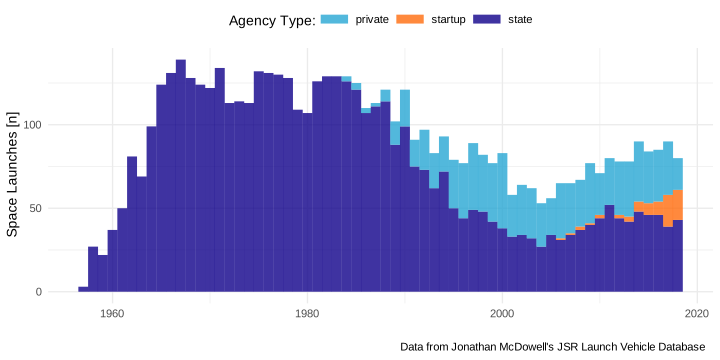<!-- --> --- class: blueblue, middle .verybig[So what?] -- .big[Let's start from the beginning...] --- class: blueblue, middle, right .big[Let's **read** the data...] -- .big[...into an R **object**...] -- .big[...and store it into a **variable**.] --- # R understands you Write something in the R console: ```r 2 # numbers ``` ``` ## [1] 2 ``` -- ```r "string of text must be quoted" # text ``` ``` ## [1] "string of text must be quoted" ``` -- ```r 2 + 2 # any mathematical operation ``` ``` ## [1] 4 ``` ```r 3^2 ``` ``` ## [1] 9 ``` --- # R understands you you can group together numbers ```r c(1, 2, 5, 6, 8, 1, 45, .2, -1) # or numbers ``` ``` ## [1] 1.0 2.0 5.0 6.0 8.0 1.0 45.0 0.2 -1.0 ``` -- operations are vectorized. ```r c(1, 2, 5, 6, 8, 1, 45, .2, -1)*2 # also for numbers ``` ``` ## [1] 2.0 4.0 10.0 12.0 16.0 2.0 90.0 0.4 -2.0 ``` --- # R understands you The same for letters. ```r c("you", "can", "group", "together", "strings", "of", "text") ``` ``` ## [1] "you" "can" "group" "together" "strings" "of" "text" ``` -- ```r paste(c("you", "can", "group", "together", "strings", "of", "text"), collapse = " ") # operation are vectorized ``` ``` ## [1] "you can group together strings of text" ``` --- class: blueblue, middle .verybig[When you type something in R, R guesses what it is.] --- # Everything in R is an object And objects have types -- ```r class(1) ``` ``` ## [1] "numeric" ``` -- ```r class("ciao") ``` ``` ## [1] "character" ``` -- ```r class(FALSE) ``` ``` ## [1] "logical" ``` -- ```r class(mean) ``` ``` ## [1] "function" ``` --- class: exercise, middle .exercise-title[Exercise:] .exercise-body[put together objects of different classes in a vector with `c(..., ...)` and see what happens.] --- ### Only elements of one class fit in a vector, others are coherced. ```r c(2,TRUE,5,FALSE,4) ``` ``` ## [1] 2 1 5 0 4 ``` -- ```r c("This", "sentence", "is", FALSE) ``` ``` ## [1] "This" "sentence" "is" "FALSE" ``` -- ```r c("The", 2, "sentences", "above", "are", TRUE) ``` ``` ## [1] "The" "2" "sentences" "above" "are" "TRUE" ``` -- ```r whatisthis # but some objects aren't recognized ``` ``` ## Error in eval(expr, envir, enclos): object 'whatisthis' not found ``` --- ### For objects of different classes, you need lists ```r list(1, "ciao", mean, c("You", "can", "put", "vectors", "into", "lists")) ``` ``` ## [[1]] ## [1] 1 ## ## [[2]] ## [1] "ciao" ## ## [[3]] ## function (x, ...) ## UseMethod("mean") ## <bytecode: 0x564589835d28> ## <environment: namespace:base> ## ## [[4]] ## [1] "You" "can" "put" "vectors" "into" "lists" ``` --- # Wrap up ``` ## # A tibble: 0 x 0 ``` A table of R object... --- class: blueblue, middle, right .big[Let's **read** the data...] .big[...into an R .orange[**object**]...] .big[...and store it into a **variable**.] --- class: blueblue, middle .verybig[Unquoted text is a variable] .big[With **`<-`**, you can store in it any object you want] --- # Let's make things confusing You can assign any object to a variable with ` <- `. ```r a <- "b" ``` When you call the variables it returns the object that you have assigned to it. ```r a ``` ``` ## [1] "b" ``` -- (same for numbers:) ```r number_1 <- 2 number_1 ``` ``` ## [1] 2 ``` --- ### Any kind of objects ```r some_numbers <- c(1,2,3) some_numbers ``` ``` ## [1] 1 2 3 ``` -- ```r some_words <- c("This", "are", "not", "numbers") some_words ``` ``` ## [1] "This" "are" "not" "numbers" ``` --- class: blueblue, middle, right .big[Let's **read** the **data**...] .big[...into an R .orange[**object**]...] .big[...and store it into a .orange[**variable**].] --- class: blueblue, middle .verybig[Some variables are already occupied] --- class: exercise, middle .exercise-title[Exercise] .exercise-body[Can you find some variables that already have an object inside? What do they store?] --- # Some variables already store data ```r mpg ``` ``` ## # A tibble: 234 x 11 ## manufacturer model displ year cyl trans drv cty hwy fl class ## <chr> <chr> <dbl> <int> <int> <chr> <chr> <int> <int> <chr> <chr> ## 1 audi a4 1.8 1999 4 auto(l… f 18 29 p comp… ## 2 audi a4 1.8 1999 4 manual… f 21 29 p comp… ## 3 audi a4 2 2008 4 manual… f 20 31 p comp… ## 4 audi a4 2 2008 4 auto(a… f 21 30 p comp… ## 5 audi a4 2.8 1999 6 auto(l… f 16 26 p comp… ## 6 audi a4 2.8 1999 6 manual… f 18 26 p comp… ## 7 audi a4 3.1 2008 6 auto(a… f 18 27 p comp… ## 8 audi a4 quat… 1.8 1999 4 manual… 4 18 26 p comp… ## 9 audi a4 quat… 1.8 1999 4 auto(l… 4 16 25 p comp… ## 10 audi a4 quat… 2 2008 4 manual… 4 20 28 p comp… ## # … with 224 more rows ``` --- # Some variables already store data ```r starwars ``` ``` ## # A tibble: 87 x 13 ## name height mass hair_color skin_color eye_color birth_year gender ## <chr> <int> <dbl> <chr> <chr> <chr> <dbl> <chr> ## 1 Luke… 172 77 blond fair blue 19 male ## 2 C-3PO 167 75 <NA> gold yellow 112 <NA> ## 3 R2-D2 96 32 <NA> white, bl… red 33 <NA> ## 4 Dart… 202 136 none white yellow 41.9 male ## 5 Leia… 150 49 brown light brown 19 female ## 6 Owen… 178 120 brown, gr… light blue 52 male ## 7 Beru… 165 75 brown light blue 47 female ## 8 R5-D4 97 32 <NA> white, red red NA <NA> ## 9 Bigg… 183 84 black light brown 24 male ## 10 Obi-… 182 77 auburn, w… fair blue-gray 57 male ## # … with 77 more rows, and 5 more variables: homeworld <chr>, species <chr>, ## # films <list>, vehicles <list>, starships <list> ``` --- # Some variables already store data ```r storms ``` ``` ## # A tibble: 10,010 x 13 ## name year month day hour lat long status category wind pressure ## <chr> <dbl> <dbl> <int> <dbl> <dbl> <dbl> <chr> <ord> <int> <int> ## 1 Amy 1975 6 27 0 27.5 -79 tropi… -1 25 1013 ## 2 Amy 1975 6 27 6 28.5 -79 tropi… -1 25 1013 ## 3 Amy 1975 6 27 12 29.5 -79 tropi… -1 25 1013 ## 4 Amy 1975 6 27 18 30.5 -79 tropi… -1 25 1013 ## 5 Amy 1975 6 28 0 31.5 -78.8 tropi… -1 25 1012 ## 6 Amy 1975 6 28 6 32.4 -78.7 tropi… -1 25 1012 ## 7 Amy 1975 6 28 12 33.3 -78 tropi… -1 25 1011 ## 8 Amy 1975 6 28 18 34 -77 tropi… -1 30 1006 ## 9 Amy 1975 6 29 0 34.4 -75.8 tropi… 0 35 1004 ## 10 Amy 1975 6 29 6 34 -74.8 tropi… 0 40 1002 ## # … with 10,000 more rows, and 2 more variables: ts_diameter <dbl>, ## # hu_diameter <dbl> ``` --- class: exercise, middle .exercise-title[Exercise] .exercise-body[Check the data that we have already seen in R: - How are they structured? - What do they have in common? ] --- # Don't try this at home ```r a_list <- list(c(1,2,3,4,5), c(TRUE, FALSE, FALSE, TRUE, FALSE), c("Some", "text", "in", "this", "column")) attributes(a_list)$row.names <- 1:5 attributes(a_list)$names <- c("my", "data", "frame") attributes(a_list)$class <- "data.frame" ``` ``` ## # A tibble: 5 x 3 ## my data frame ## <dbl> <lgl> <chr> ## 1 1 TRUE Some ## 2 2 FALSE text ## 3 3 FALSE in ## 4 4 TRUE this ## 5 5 FALSE column ``` --- class: blueblue, middle, right .big[Let's **read** the .orange[**data**]...] .big[...into an R .orange[**object**]...] .big[...and store it into a .orange[**variable**].] --- class: blueblue, middle .verybig[In R you do everything with functions] --- # Some variables already store functions ```r mean ``` ``` ## function (x, ...) ## UseMethod("mean") ## <bytecode: 0x564589835d28> ## <environment: namespace:base> ``` ```r c ``` ``` ## function (...) .Primitive("c") ``` ```r plot ``` ``` ## function (x, y, ...) ## UseMethod("plot") ## <bytecode: 0x564587e63228> ## <environment: namespace:graphics> ``` --- # Some variables already store functions ```r read_csv ``` ``` ## function (file, col_names = TRUE, col_types = NULL, locale = default_locale(), ## na = c("", "NA"), quoted_na = TRUE, quote = "\"", comment = "", ## trim_ws = TRUE, skip = 0, n_max = Inf, guess_max = min(1000, ## n_max), progress = show_progress(), skip_empty_rows = TRUE) ## { ## tokenizer <- tokenizer_csv(na = na, quoted_na = quoted_na, ## quote = quote, comment = comment, trim_ws = trim_ws, ## skip_empty_rows = skip_empty_rows) ## read_delimited(file, tokenizer, col_names = col_names, col_types = col_types, ## locale = locale, skip = skip, skip_empty_rows = skip_empty_rows, ## comment = comment, n_max = n_max, guess_max = guess_max, ## progress = progress) ## } ## <bytecode: 0x56458a6fb210> ## <environment: namespace:readr> ``` --- class: blueblue, middle .big[.orange[f] ( .orange[Arg1] , .orange[Arg2], ...)] -- .big[\> .orange[Output]] --- # Example: how to use the `mean()` function It takes numbers as the main input `x` and gives numbers as output: ```r mean(x = 1) ``` ``` ## [1] 1 ``` -- You might want to know the mean of more than one number. Use a vector: ```r mean(x = c(1,5,3,7,22,-34, 3.1, 0.4)) ``` ``` ## [1] 0.9375 ``` -- You can provide extra arguments, for example on how to deal with missing values. ```r mean(x = c(1,5,3,7,22,-34, 3.1, 0.4, NA_real_), na.rm = TRUE) ``` ``` ## [1] 0.9375 ``` --- # Example: how to use the `mean()` function You can provide a variable as argument: ```r some_numbers <- c(1,5,3,7,22,-34, 3.1, 0.4) ignore_na_strategy <- TRUE *mean(x = some_numbers, na.rm = ignore_na_strategy) ``` ``` ## [1] 0.9375 ``` -- And store the result in another variable: ```r my_mean_value <- mean(x = some_numbers, na.rm = ignore_na_strategy) ``` `my_mean_value` now stores the output of the function: ```r my_mean_value ``` ``` ## [1] 0.9375 ``` --- # Example: how to use the `mean()` function To access the help page of a function write its name after a question mark `?mean`. (or search it on google...) ## Many packages are documented online For example https://readr.tidyverse.org/ Help pages provide technical information on how to use the function, they don't introduce you to it, they are not discoursive. They don't tell you in which when, in which contect or in which combination you would use the function. For that you need books, vignettes and blog articles. (Learning R on help pages is like learning biology - (from zero!) on peer reviwed articles) --- class: blueblue, middle, right .big[You can find functions in .orange[**Packages**]] --- class: blueblue, middle .verybig[Packages are organized collection of functions.] .big[...with metadata and documentation] --- class: blueblue, middle .verybig[Why do we need packages?] --- # For example, import CSV We would like to read a csv into R. There is a function that read the contents of text file, which is part of **base** R: ```r # sample_file <- "https://raw.githubusercontent.com/rfordatascience/tidytuesday/master/data/2019/2019-01-15/launches.csv" sample_file <- here::here("data/sample.csv") readLines(con = sample_file, n = 5) ``` ``` ## [1] "tag,JD,launch_date,launch_year,type,variant,mission,agency,state_code,category,agency_type" ## [2] "1967-065,2439671.38,1967-06-29,1967,Thor Burner 2,,Secor Type II S/N 10,US,US,O,state" ## [3] "1967-080,2439725.7,1967-08-23,1967,Thor Burner 2,,DAPP 3419,US,US,O,state" ## [4] "1967-096,2439774.83,1967-10-11,1967,Thor Burner 2,,DAPP 4417,US,US,O,state" ## [5] "1968-042,2439999.69,1968-05-23,1968,Thor Burner 2,,DAPP 5420,US,US,O,state" ``` --- # For example, import CSV But we don't need to call it directly, we can call a higher level functions that reads the contents from a CSV file and structures it in a dataframe. ```r read.csv(file = sample_file, nrows = 5) ``` ``` ## tag JD launch_date launch_year type variant ## 1 1967-065 2439671 1967-06-29 1967 Thor Burner 2 NA ## 2 1967-080 2439726 1967-08-23 1967 Thor Burner 2 NA ## 3 1967-096 2439775 1967-10-11 1967 Thor Burner 2 NA ## 4 1968-042 2440000 1968-05-23 1968 Thor Burner 2 NA ## 5 1968-092 2440153 1968-10-23 1968 Thor Burner 2 NA ## mission agency state_code category agency_type ## 1 Secor Type II S/N 10 US US O state ## 2 DAPP 3419 US US O state ## 3 DAPP 4417 US US O state ## 4 DAPP 5420 US US O state ## 5 DAPP 6422 US US O state ``` `read.csv` uses `readLines` an performs many other operations that are needed to read a CSV file into R. --- # For example, import CSV Sometimes you have many function that does the same job, and that have similar names! Tip: in doubt use the ones with the low dash "_" instead of the dot ".". ```r read_csv(sample_file) ``` ``` ## # A tibble: 10 x 11 ## tag JD launch_date launch_year type variant mission agency state_code ## <chr> <dbl> <date> <dbl> <chr> <lgl> <chr> <chr> <chr> ## 1 1967… 2.44e6 1967-06-29 1967 Thor… NA Secor … US US ## 2 1967… 2.44e6 1967-08-23 1967 Thor… NA DAPP 3… US US ## 3 1967… 2.44e6 1967-10-11 1967 Thor… NA DAPP 4… US US ## 4 1968… 2.44e6 1968-05-23 1968 Thor… NA DAPP 5… US US ## 5 1968… 2.44e6 1968-10-23 1968 Thor… NA DAPP 6… US US ## 6 1969… 2.44e6 1969-07-23 1969 Thor… NA DAPP 7… US US ## 7 1970… 2.44e6 1970-02-11 1970 Thor… NA DAPP B… US US ## 8 1970… 2.44e6 1970-09-03 1970 Thor… NA DAPP B… US US ## 9 1971… 2.44e6 1971-02-17 1971 Thor… NA DAPP B… US US ## 10 1971… 2.44e6 1971-06-08 1971 Thor… NA P70-1 US US ## # … with 2 more variables: category <chr>, agency_type <chr> ``` --- class: exercise, middle .exercise-title[Exercise] .exercise-body[ Find a CSV or any kind of delimited text file and read it in R. ] --- class: blueblue, middle .verybig[Packages are there to implement a specific functionality] .big[for example....] --- # You can read data into R with reader .center[ </p> <a href="https://readr.tidyverse.org/" class="imagelink"> <img src="img/readr.svg" alt="hex-readr" height="400" width="400"></a> <p> ] --- # You can pipe your operations with magrittr .center[ </p> <a href="https://magrittr.tidyverse.org/" class="imagelink"> <img src="img/SVG/magrittr.svg" alt="hex-magrittr" height="450" width="400"></a> <p> ] --- # You can manipulate text with stringr .center[ </p> <a href="https://stringr.tidyverse.org/index.html" class="imagelink"> <img src="img/SVG/stringr.svg" alt="hex-stringr" height="400" width="400"></a> <p> ] --- # You can manipulate data with dplyr .center[ </p> <a href="https://dplyr.tidyverse.org/" class="imagelink"> <img src="img/SVG/dplyr.svg" alt="hex-dplyr" height="400" width="400"></a> <p> ] --- # You can apply functions with purrr .center[ </p> <a href="https://purrr.tidyverse.org/" class="imagelink"> <img src="img/SVG/purrr.svg" alt="hex-purrr" height="400" width="400"></a> <p> ] --- # You can plot with ggplot2 .center[ </p> <a href="https://ggplot2.tidyverse.org/" class="imagelink"> <img src="img/SVG/ggplot2.svg" alt="hex-ggplot2" height="400" width="400"></a> <p> ] --- class: blueblue, middle .verybig[We will see these packages in detail after lunch :)] --- # To use a package must to take two steps: First **install the package** on your laptop. You must do this **only once**. ```r install.packages("tidyverse") ``` Then, **load the package** in your R environment. You must do this in **every R session** (if you want to use that package). ```r library(tidyverse) ``` --- class: blueblue, orange .verybig[But if you want....] --- # You can write your own functions! ```r per_due <- function(n = 1) n*2 per_due() ``` ``` ## [1] 2 ``` ```r per_due(23) # Try it out ``` ``` ## [1] 46 ``` ```r greet <- function(person) { person <- stringr::str_to_title(person) paste0("Hi ", person, ", how are you?") } greet("Otho") ``` ``` ## [1] "Hi Otho, how are you?" ``` --- # You can write your own functions! ```r hypot <- function(a = 1, b = 1) { sqrt(a^2 + b^2) } hypot(3, 4) ``` ``` ## [1] 5 ``` ```r plot_blue_circle <- function(radius = .2) { grid::grid.circle(r = radius, gp = grid::gpar(fill = "#27A6D3")) } plot_blue_circle() ``` <!-- --> --- class: exercise, middle .exercise-title[Exercise:] .exercise-body[Write a function that checks if there is an ATG in a string of text (DNA).] --- class: blueblue, middle, right .big[Let's .orange[**read**] the .orange[**data**]...] .big[...into an R .orange[**object**]...] .big[...and store it into a .orange[**variable**].] --- class: blueblue, middle .verybig[Let's do it!] --- # Data is on Github https://github.com/rfordatascience/tidytuesday/tree/master/data/2019/2019-01-15 And it was used by the economist to perform [this viz](https://www.economist.com/graphic-detail/2018/10/18/the-space-race-is-dominated-by-new-contenders). --- # You can find the data locally in the data folder at the path `data/launches.csv`. ```r library(readr) launches_path <- here::here("data", "launches.csv") launches <- read_csv(file = launches_path) ``` ``` ## Parsed with column specification: ## cols( ## tag = col_character(), ## JD = col_double(), ## launch_date = col_date(format = ""), ## launch_year = col_double(), ## type = col_character(), ## variant = col_character(), ## mission = col_character(), ## agency = col_character(), ## state_code = col_character(), ## category = col_character(), ## agency_type = col_character() ## ) ``` --- # And they are instantly ready for use We read the data with `read_csv()` into an R ´tibble` object, and assigned them to the variable launches` ```r launches ``` ``` ## # A tibble: 5,726 x 11 ## tag JD launch_date launch_year type variant mission agency state_code ## <chr> <dbl> <date> <dbl> <chr> <chr> <chr> <chr> <chr> ## 1 1967… 2.44e6 1967-06-29 1967 Thor… <NA> Secor … US US ## 2 1967… 2.44e6 1967-08-23 1967 Thor… <NA> DAPP 3… US US ## 3 1967… 2.44e6 1967-10-11 1967 Thor… <NA> DAPP 4… US US ## 4 1968… 2.44e6 1968-05-23 1968 Thor… <NA> DAPP 5… US US ## 5 1968… 2.44e6 1968-10-23 1968 Thor… <NA> DAPP 6… US US ## 6 1969… 2.44e6 1969-07-23 1969 Thor… <NA> DAPP 7… US US ## 7 1970… 2.44e6 1970-02-11 1970 Thor… <NA> DAPP B… US US ## 8 1970… 2.44e6 1970-09-03 1970 Thor… <NA> DAPP B… US US ## 9 1971… 2.44e6 1971-02-17 1971 Thor… <NA> DAPP B… US US ## 10 1971… 2.44e6 1971-06-08 1971 Thor… <NA> P70-1 US US ## # … with 5,716 more rows, and 2 more variables: category <chr>, ## # agency_type <chr> ``` --- # Plotting in R is easy ```r ggplot(data = launches, mapping = aes(x = launch_year, fill = agency_type)) + geom_histogram() ``` 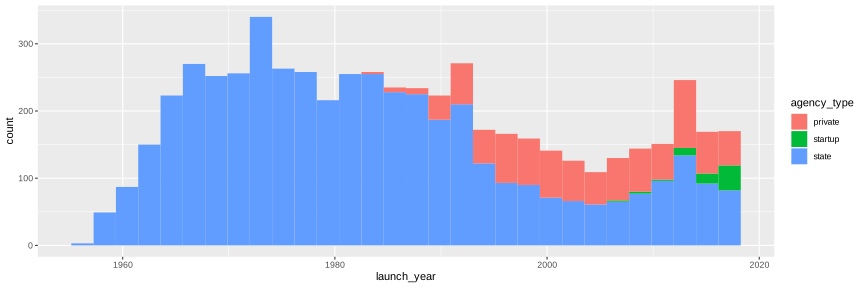<!-- --> Data from Jonathan McDowell's JSR Launch Vehicle Database